MA Exams | Google Ads Targeting
This training will cover different targeting options in Google Ads.

Last Updated on January 30, 2025
This training will cover different targeting options in Google Ads.

Google Ads provides multiple methods of targeting. Targeting is how you tell Google what types of people you want to show ads to. Different campaign types have different targeting options.
First, it will be helpful to understand some basic vocabulary:
 When adding an audience to a search campaign, you have two options: Targeting or Observation.
If you choose “Targeting”, you will be limiting ads to only those within the audience. If you choose “Observation”, you will get a report of how people within that audience interacted with your ads. So if you choose to add the in-market audience “Hosted Data & Cloud Storage” with an “Observation” targeting setting, the report will show the metrics for everyone within that audience that has searched a term that triggered an ad.

* = Treated as a target adjustment
Types of Audiences:
This video describes 3 of the biggest audience types:
Optimized targeting allows Google to select audience targeting for you.
Bid adjustments are a percentage increase or decrease in your bids. Bid adjustments allow you to show your ads more or less frequently based on where, when, and how people search. For example, sometimes a click is worth more to you if it comes from a smartphone, at a certain time of day, or from a specific location. You can also adjust your bids based on how your ads perform, helping to improve your return on investment (ROI).
If you are using a manual bidding strategy, you can also add a bid adjustment to an audience, so if a specific audience is performing better than the general traffic, you can increase the amount you are willing to spend for each click by some percentage.
If you are using a smart (automated) bidding strategy, bid adjustments don’t impact the cost per click.
Bid adjustments can be made to more than just Observation audiences. You can also add bid adjustments to locations, times of day, and device. However, if you are using automated Smart Bidding strategies including Target CPA, Target ROAS, Maximize conversions, and Maximize conversion value, you don’t need to make manual bid adjustments since those strategies automatically set bids to optimize for the conversion goal specified by the customer. If you make a manual bid adjustment to your automated Smart Bidding strategy it won’t be supported. With device bid adjustments for Target CPA, you are modifying the value of your CPA target.
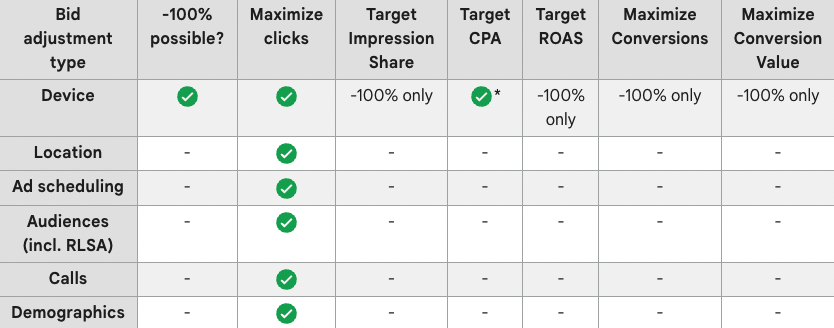
* = Treated as a target adjustment
RLSA stands for remarketing lists for search ads. It is exactly what it sounds like. They are remarketing lists that you add to a search campaign. The purpose is to see how people who have interacted with your site in the past interact with your site. In general, the idea is that people who have already visited your site will be more likely to convert than general visitors. A potential use of RLSA would be to create a campaign with more general or broad match keywords with the “Targeting” targeting setting selected.