Last Updated on January 28, 2025
Google Ads Bidding Strategies
This training will cover the Google Ads campaigns that we work with at Sebo Marketing. One of the biggest parts of creating a campaign in Google Ads is deciding which Smart Bidding strategy to use. This training will cover the different types of Smart Bidding and when they are appropriate to use.
Lastly, you will take an exam and send it to the Fulfillment Manager. Throughout the training, if you have any questions, email the Fulfillment Manager.
As you learned above, one of the main factors affecting ad rank (and the ultimate position of the ad) is the keyword bid. The bid is how much you are willing to pay for a click, and the bidding strategy is key in determining the bid.
There are 5 main bidding strategies. Each with its own ideal circumstances in which it should be used. There are two categories of bidding strategies: manual and automated. There is only one manual bidding strategy; the other four are automated.
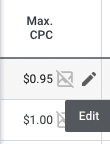
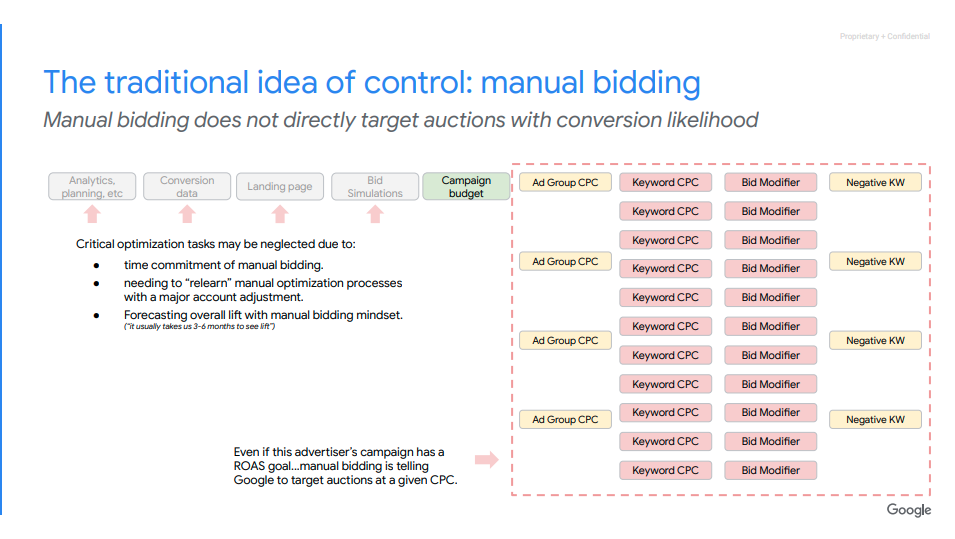
The manual bidding strategy is called Manual CPC. With manual CPC, the advertiser chooses the Max CPC for each keyword. The Max CPC is the maximum the advertiser is willing to pay for a click. The only way to change the Max CPC for a keyword is to sign in to the account and make the change at the keyword level. (You can also set Max CPC at an ad group level, but if there is a Max CPC set for a keyword, that will supersede the ad group’s Max CPC.)
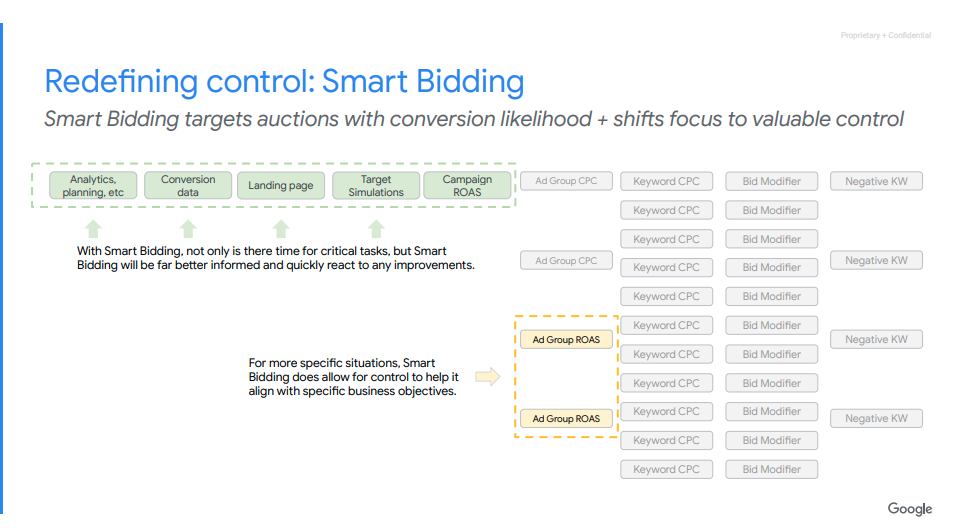
Advertisers who have been working with Google Ads for several years sometimes prefer Manual CPC. They feel that it gives them more control than automated bidding strategies. Here is how Google see control in bidding.
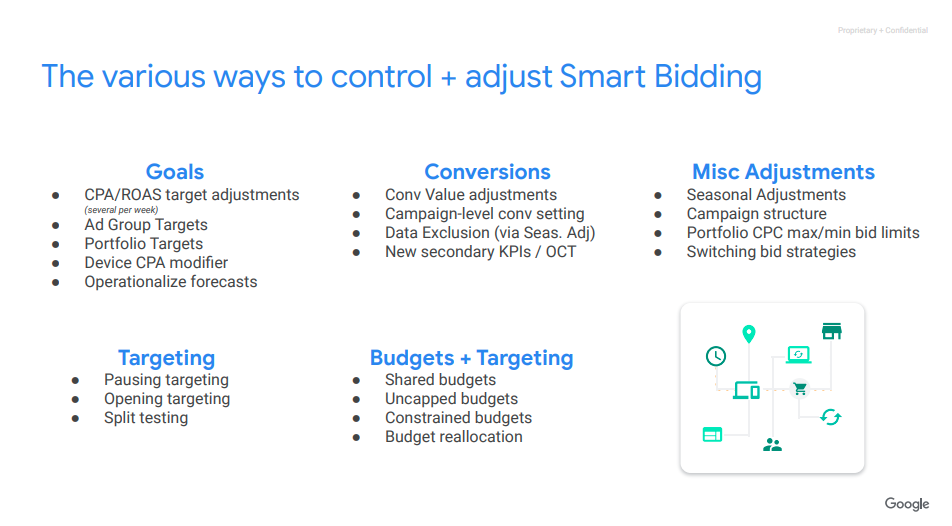
Due to Google’s push to Smart Bidding you will likely be seeing less and less campaigns with Manual CPC. When you create a new campaign you are not able to have it do Manual bidding, but you can change it in settings after you create the campaign. If you would like to learn more about what you can control in Smart Bidding you can read this deck from Google.
When to use Manual Bidding?
- Not a lot of volume of data
- Retain control over individual keyword bids
- Automated bidding performs poorly
The automated bidding strategies are:
- Maximize clicks
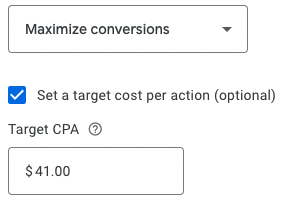
- Maximize conversions (with or without Target CPA)
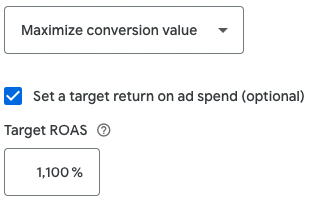
- Maximize conversion value (with or without Target ROAS)
- Target Impression Share
With automated bidding strategies, Google will automatically set bids in an effort to reach the bidding strategy’s goal. But what does this actually mean? In practice, each time there is a search done on Google, Google Ads uses machine learning to analyze the likelihood of the searcher completing an action that will help meet the goals of the bidding strategy. If the likelihood is high, Google Ads will increase the bid (Max. CPC). If the likelihood is low, Google Ads will bid low for that query.
Google Ads’ machine learning bases the likelihood on historical data from the Google Ads account and the information they have on the searcher.
When should you use each bidding strategy? With all of the automated bidding strategies, having more data is better. If you are not sure if the volume of data is enough to use an automated bidding strategy, you can test the bidding strategy to see if the profit of the campaign improves. With that in mind, the following are the general best practices for each bidding strategy.
As with most things within Google Ads, what you’ve learned are best practices. If you believe one strategy might work better over another even though it’s not a best practice, you can test it for a month and find out. If you ever want to adjust a bidding strategy always consult the MC before changing anything.
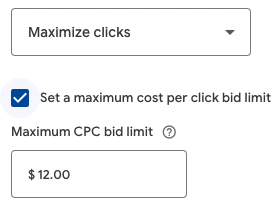
Maximize clicks: Google Ads will automatically set bids to generate as many clicks to your website as possible given the constraints of the target keywords and the budget. You can set a maximum cost per bid limit, so Google won’t spend more than the limit on a click.
When to use Maximize Clicks
- Keyword targeting is narrow
- Traffic volume is highly important
- Conversion tracking isn’t set up correctly
- Starting a new account
Maximize conversions: Google Ads will automatically set bids to generate the highest possible number of conversions given the target keywords and budget. The value of the conversion isn’t a factor here, so if you have one conversion valued at $50 and another at $10, Google Ads will still only try to get the most conversions possible.
Target CPA (cost-per-acquisition): Target CPA is set as an option after selecting maximize conversions. Google Ads will automatically set bids for you to get as many conversions as possible given the budget and target keywords, but with the added constraint of a desired average cost per conversion.
- When you’re using Maximize conversions without a Target CPA set, we’ll aim to spend your budget to maximize conversions for your campaigns.
- When you’re using Maximize conversions with a Target CPA set, we’ll help to get as many conversions as possible at the target cost-per-action (CPA).
A Note on Bid Adjustments
Bid adjustments allow you to show your ads more or less frequently based on where, when, and how people search. Because Maximize conversions help optimize your bids based on real-time data, your existing bid adjustments aren’t used. There is one exception: You can still set device bid adjustments to -100%.
When to us Max Conversions
- Conversion tracking is set up
- Conversion value isn’t accurate or doesn’t vary
- The campaign is limited by budget
Target CPA
- Conversion tracking is set up
- Conversion value isn’t accurate or doesn’t vary
- The campaign is not limited by budget
Maximize conversion value: Google Ads automatically sets bids to maximize the conversion value given the keywords and budget. This is similar to maximize conversions, except with this strategy, Google Ads will take the value of different conversions into account. Another way to say it is that Google Ads will seek to maximize the ROI of the campaign.
Target ROAS (return on ad spend): Target ROAS is set as an option after selecting maximize conversion value.Similar to maximize conversion value, Google Ads automatically sets bids to maximize the value of the campaign with a target ROAS goal. Your target ROAS is the average conversion value you’d like to get for each dollar you spend on ads. So if you’d like to generate $5 in sales for every $1 spent in Google Ads, the target ROAS would be 500%.
When to use:
Maximize Conversion Value
- Conversions are set up
- Conversion value is accurate
- The campaign is limited by budget
Target ROAS
- Conversions are set up
- Conversion value is accurate
- The campaign is not limited by budget
Target Impression Share: sets bids with the goal of showing your ad on the absolute top of the page, on the top of the page, or anywhere on the page of Google search results.
Settings
Placement
There are 3 options for the Target impression share strategy, depending on where you want your ads to show: on the absolute top of the page, on the top of the page, or anywhere on the page of Google search results. Google Ads automatically sets your bids to show your ad, based on your placement settings.
For example, if you choose an impression share target of 65% on the absolute top of the page, Google Ads will automatically set your CPC bids to help show your ads on the absolute top of the page 65% of the total possible amount of times they could show.
Bid limits
The Max CPC bid limit is a cap on bids set by this bid strategy. It’s important not to set this limit too low. Otherwise it can restrict the bids set by the strategy and prevent you from reaching your impression share goal.
Bid adjustments and Target impression share
Bid adjustments allow you to show your ads more or less frequently based on where, when, and how people search. As Target impression share helps optimize your bids based on real-time data, your existing bid adjustments won’t be used. You can still set device bid adjustments of -100% to prevent your ad from showing on devices. You don’t need to remove any existing bid adjustments—they just won’t be used.
When to use Target Impression Share:
- Campaign is for brand terms
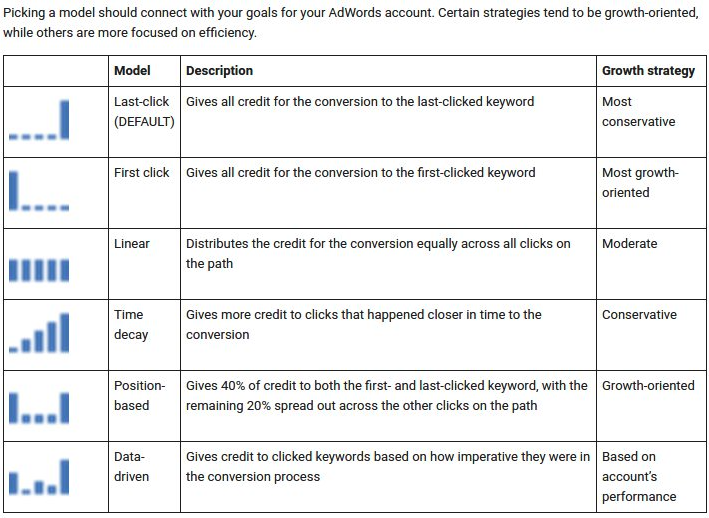
Google recommends not using last-click attribution for conversions. Learn about the attribution models below: