Last Updated on January 30, 2025
Welcome to the fundamentals of PPC and Google Ads training and exam!
This training will introduce you to Pay-Per-Click and Google Ads. Google Ads is a type of Pay-Per-Click (PPC) advertising. Often, the terms PPC and Google Ads are used interchangeably in the Digital Marketing world. However, while Google is by far the most popular PPC platform, there are other PPC platforms out there (i.e. Bing Ads). To complicate it further – not all advertising done through Google Ads is paid per click. To keep things simple though, just know that PPC often refers to Google Ads.
At the end of this training you will take an exam. Feel free to reach out to the Fulfillment Manager with any questions regarding this training module.
Pay-Per-Click
PPC stands for pay-per-click and is a form of paid online advertising. As the name implies, when marketing with PPC, the advertiser only pays for actual clicks on their ads. There are exceptions to this, but in general, this is the case. The two main platforms for PPC are Google Ads and Bing Ads. You’ll rarely spend any time optimizing Bing Ads accounts. At Sebo Marketing, we almost exclusively work in Google Ads when doing PPC for a client.
Paid results differ from organic results in that the ads rank is based on a system called Ad Rank instead of Google’s normal algorithm. Ad Rank takes many things into account, but the main factors of Ad Rank are bid, quality score, and the use of ad assets. Don’t worry too much right now about understanding Ad Rank. All you need to know now is that the amount someone is willing to pay for a click is a major factor in the ad being shown and its placement. Paid results cost money for each visitor and organic results do not.
Google Ads Networks
Google Ads provides paid advertising on four main networks. These networks are search, display, shopping, and video (YouTube Ads).
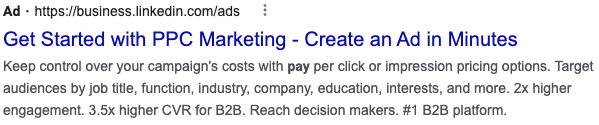
The search network is a group of search-related sites. Mostly, it’s Google Search (although some smaller search engines, such as ask.com, are a part of it as well). An ad in the search network will show up in the SERP at the top and bottom of the page.
YouTube Ads provides an advertiser the opportunity to advertise to people on YouTube. These video ads can show before a video, in the middle of a video, as a suggestion, or in a YouTube search.
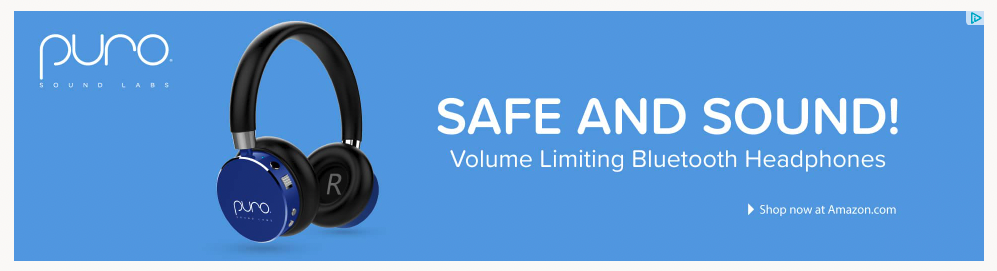
The display network is a group of more than 2 million websites, videos, and apps where an ad can appear. It reaches over 90% of internet users worldwide. These are image ads that appear on websites. There are multiple ways to target ads on the display network.
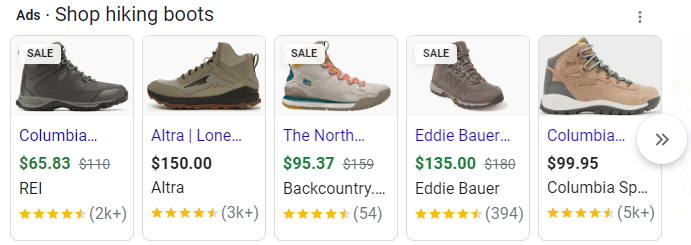
Shopping ads allow an advertiser to advertise their products directly on the SERP. These ads require an image, description, and price.
Google Ads Account Structure
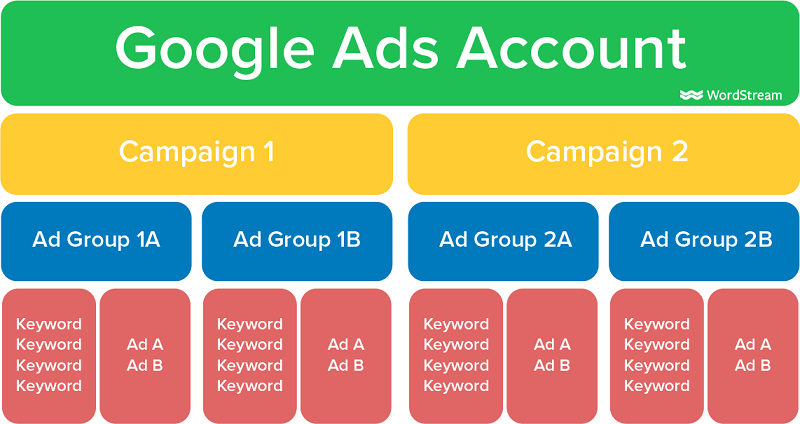
Within a Google Ads account, there are campaigns. Within campaigns, there are ad groups, and within ad groups, there are keywords and ads. At each level, there are different options for optimization and control of the account.
A Google Ads campaign is the broadest organizational level of the account. Campaigns contain ad groups. It is at the campaign level that you decide the geographic location the ads will show, the network, the language, and the daily budget.
Ad groups are the next level of organization. Ad groups contain keywords and ads. At the ad group level, you are indicating to Google what ads will show for which keywords.
Keywords are how we indicate to Google what search queries we want the client’s ad to show for. If we add the keyword “hiking boots” to an ad group, we are telling Google that anytime someone searches for “hiking boots” or a close variant, we want to show one of the ads in the same ad group.
Ads are simply the result we want Google to show for the keywords.
Landing Pages
Once someone has made a search, seen an ad, and clicked on the ad, they are then taken to a landing page. A landing page is the web page an ad is directing traffic to. Optimizing landing pages will be an essential part of your job and will be a consistent task for any Google Ads client. There are many best practices for landing pages, but each landing page will have a few basic elements:
- Call to action – this could be a form fill, a phone call, or a purchase
- Benefits – Text, images, or other that highlight the benefits that your product/service bring to the user
- Social Proof – Reviews, company logos, testimonials, etc.
- USP – A Unique Selling Proposition. What makes your product/service different from the competition?
- Additional information – details of the product, service, and/or business
- A thank you message when someone completes the call to action
The Process from Search to Payment
The following is a step-by-step process of a potential client becoming a paying client for a business using Google Ads. The person with the problem will be called Jeremy and the business will be called Company X.
- Jeremy has a problem.
- He enters a query into Google Search looking to solve his problem.
- He sees an ad that claims Company X can solve his problem.
- He is convinced Company X might be able to solve his problem so he clicks on the ad.
- Jeremy is directed to a landing page on Company X’s website. The landing page contains information that convinces Jeremy that Company X can solve his problem.
- Jeremy fulfills the landing page’s call to action. In this case, he fills out a form.
- Company X receives Jeremy’s information (if the call to action was a phone call, they would answer the phone) and begins the sales process of convincing Jeremy to purchase their solution.
- Jeremy then either decided Company X’s solution is worth the money and pays them, becoming a customer, or he decides Company X’s solution isn’t worth it and doesn’t pay them.
The process for e-commerce is very similar except instead of the call to action being a form fill or a phone call, the call to action is to purchase the product. With e-commerce, generally, leads aren’t generated or nurtured.
Way to go on finishing this module’s training. Below is the exam for this module. Fill out the form and press submit.