Last Updated on January 28, 2025

MA Exams Level 1 | Ad Groups and Keywords

This training will be your first real introduction to PPC with a focus on Google Ads. Much of the training here will be a review of the Google Ads Search exam. Repetition will help you remember the information, so be patient if it seems redundant.

After you have finished the training module you will take an exam with the Fulfillment Manager. Throughout the training, if you have any questions, email one of the trainers or talk to them in person, or reach out over Google Chat. When you’ve finished the training, feel free to go over the exam and then schedule a time to take the exam with the Fulfillment Manager on Google Calendar.

Picking Keywords

The Keyword Planner

The best way to generate more traffic to an account other than increasing the budget (if the campaign is limited by budget), is to add new keywords. You will also find many situations where the current keywords aren’t generating as relevant traffic as desired, so you will need to find new keywords to add to the account. The best tool to do this with is the Keyword Planner.

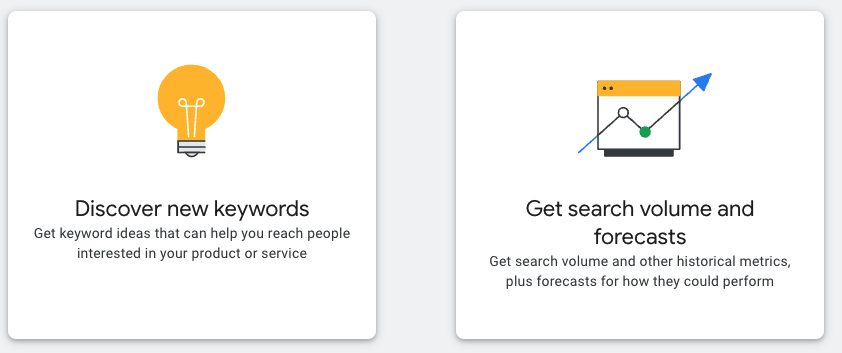
You can use the keyword planner to discover new keywords or get volume and forecast data on a list of keywords.

Most of the time, you will be using the tool to discover new keywords. To discover new keywords, you can either choose to enter in related terms to what you are looking for, or you can enter a website. Once you’ve done so, you will have a list of keywords, their volume, and estimated costs per click. The most important part of choosing the keywords is to choose relevant keywords that actually have searches and don’t cost too much. You can look at this as relevance, volume, and competition. However, even with highly competitive keywords, it can still be useful to add them to the account to see if they can be profitable.

From this list, you can select keywords and either add them directly to an existing ad group or add them to a plan. If you add them to the plan, you can view your list’s historical metrics or a forecast of the estimated traffic and cost.

You will use the Keyword Planner tool often. You will learn more about its actual use in the next PPC training.

Keywords (also search keywords) in reference to Google Ads, are how you indicate to Google what search queries you want your ads to show for on the results page. They are a fundamental part of Google Ads, and optimizing an account for the right keywords is a significant part of running a successful Google Ads account.

Keyword Match Types

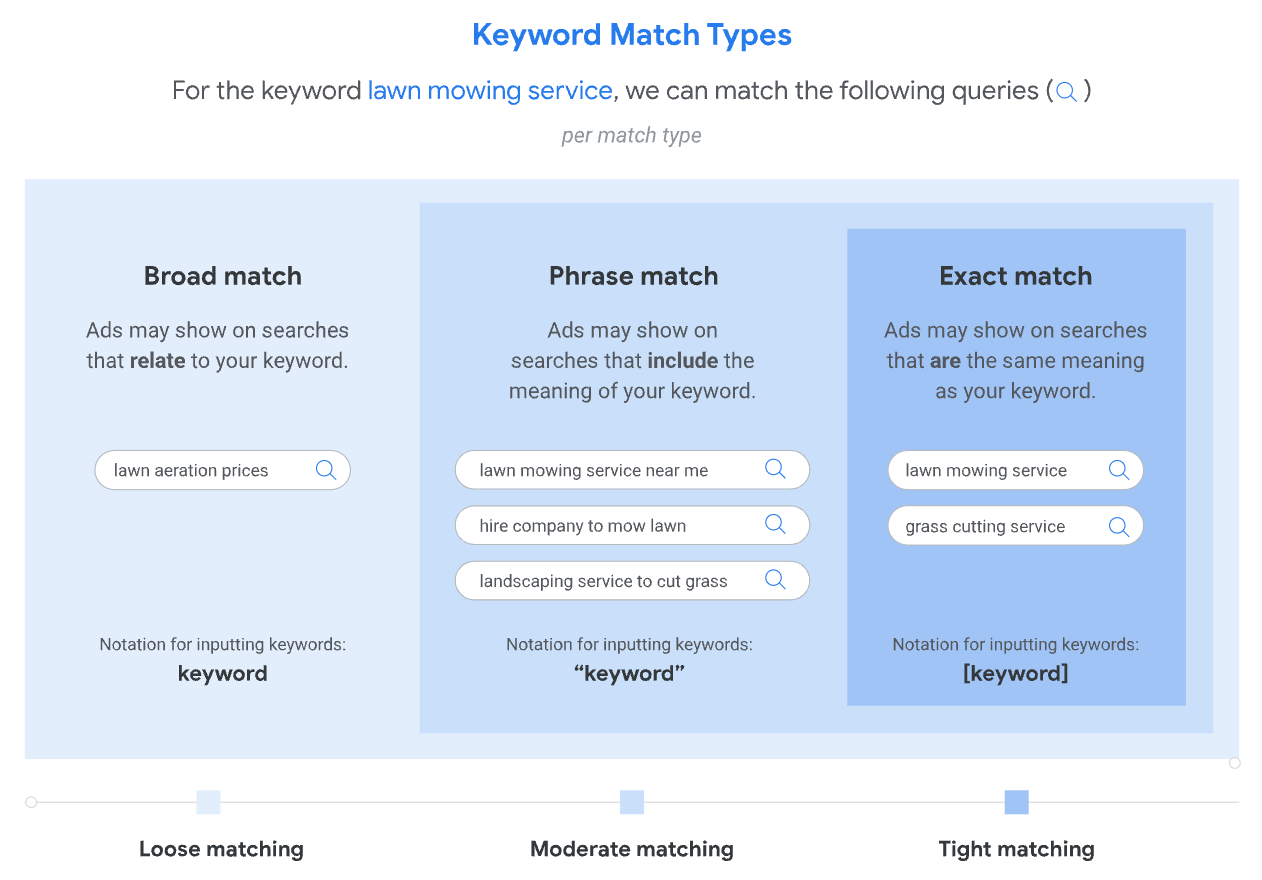
When adding keywords to an ad group, you can choose from three different match types. The basic purpose of these match types is to define how narrow you’d like the targeting to be. With each match type, you are signaling to Google how much a search query can deviate from the keyword and still have an ad show.

The three match types are broad, phrase, and exact.

Broad Match

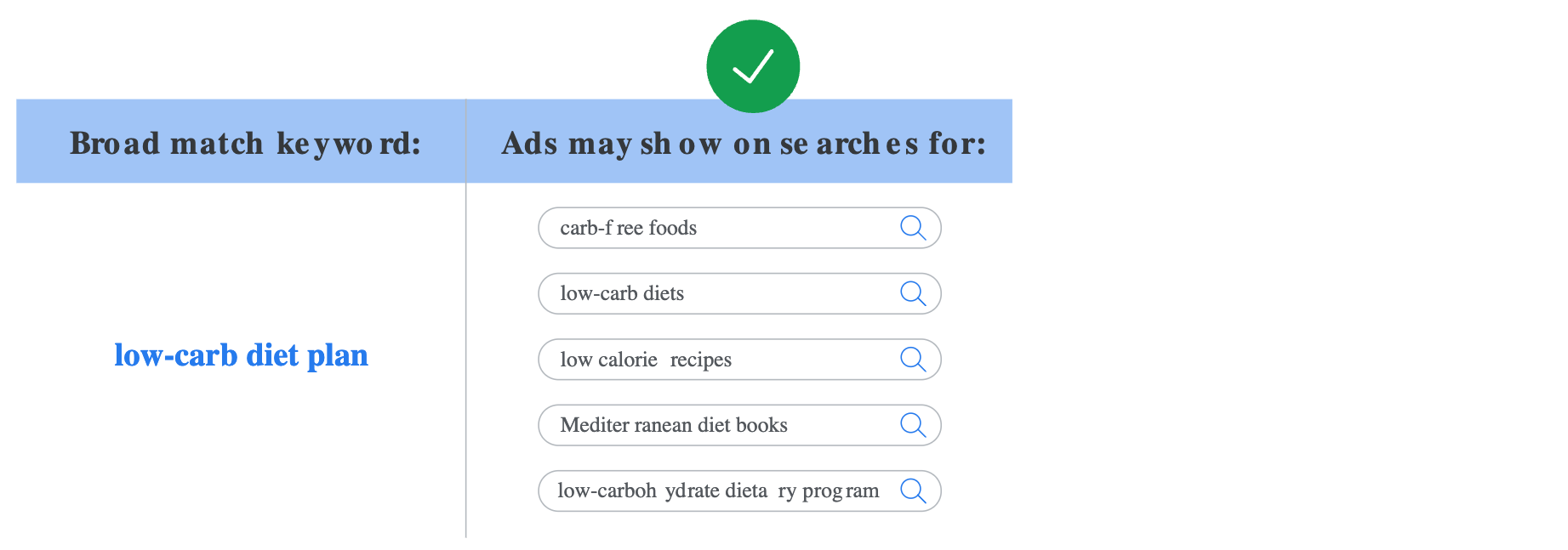
Ads may show on searches that are related to your keyword, which can include searches that don’t contain the keyword terms. Google wants you to use this match type, but be careful not to trust it too much. Only use this match type when you are very confident in the tracking of conversions. This includes conversion value. The best case to use broad match is if you are tracking actual sales. This could be through transaction tracking or offline conversion tracking (you’ll learn more about offline conversion tracking much later).

The syntax for broad match is to simply input the keyword. Below is an example of how broad match works.

Phrase Match

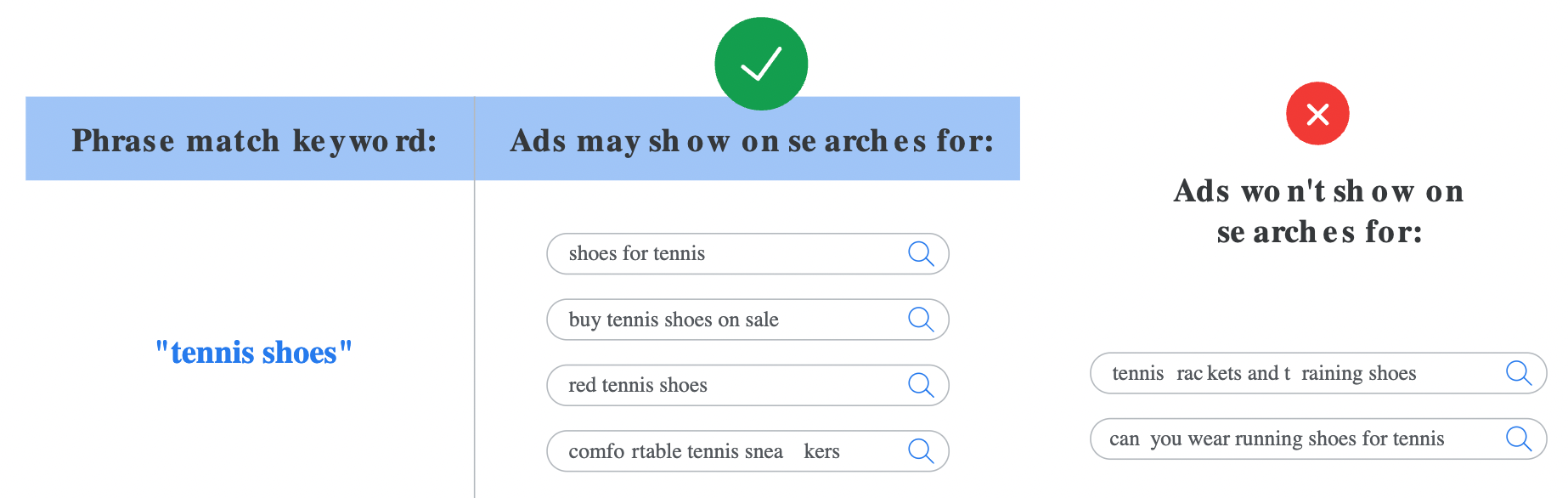
Ads may show on searches that include the meaning of your word. The meaning of the keyword can be implied, and user searches can be a specific form of the meaning. Phrase match reaches more viewers than exact match, but less than broad, only showing your ads on the searches that include the product or service. Phrase match is a good place to start. Unless otherwise directed, use phrase match when adding keywords to an account.

The syntax for phrase match is to put quotes around your keyword, such as “tennis shoes”. Below is an example of how phrase match works:

Exact Match

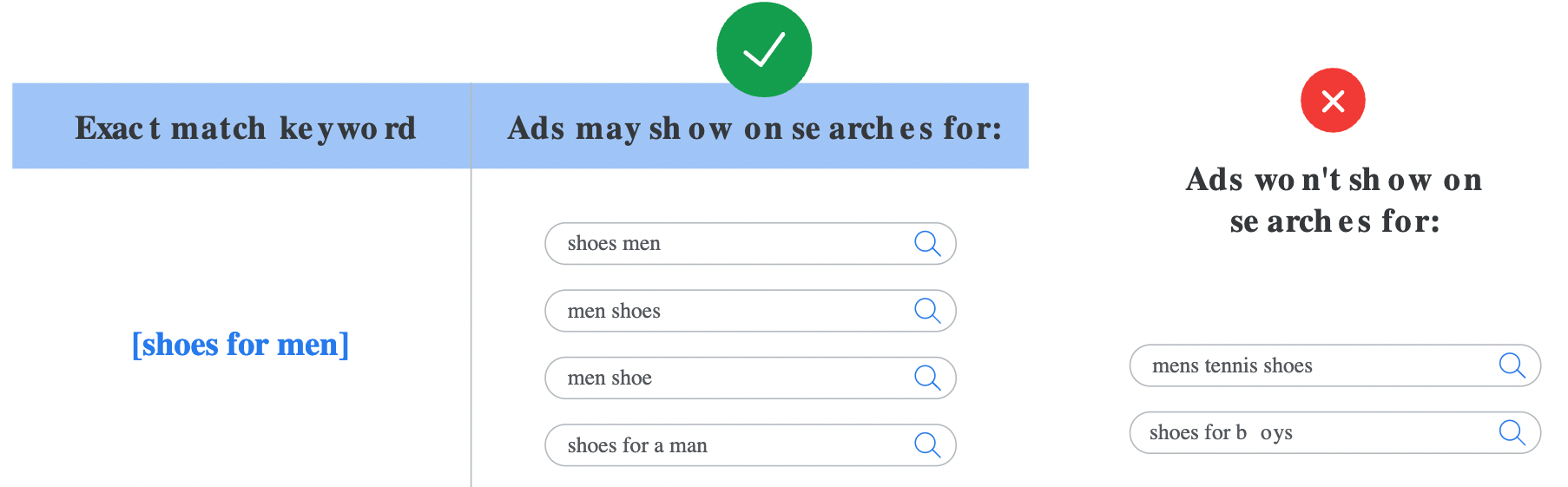
Ads may show on searches that have the same meaning or same intent as the keyword. Of the 3 keyword matching options, exact match gives you the most control over who views your ad but reaches fewer searches than both phrase and broad match. Use exact match when you want to keep the traffic as relevant as possible.

The syntax for exact match is to use square brackets, such as [red shoe]. Below is an example of how exact match works:

Summary

There are three different keyword match types that range from loose matching (broad) to tight matching (exact).

  • Broad: ads will show on searches that are related to your keyword 
  • Phrase: ads will show on searches that include the meaning of your keyword
  • Exact: ads will show on searches that are the same meaning as your keyword

Search terms are there actual search queries your search keywords generated.

Negative keywords are words or phrases that we tell Google we do not want our ad to show for.

Quality score is a measurement from 1 to 10 on how good the ad and landing page experience is, compared to other advertisers for a specific keyword.

Negative Keywords

Negative keywords let you exclude search terms from your campaigns and help you focus on only the keywords that matter to your customers. When you add a negative keyword to an ad group or campaign, you are telling Google you don’t want that word or phrase to be included in the search queries that trigger your ads.

As with normal search keywords, there are different types of negative keywords: broad, phrase, and exact. However, they work slightly different than with search keywords.

Negative broad match

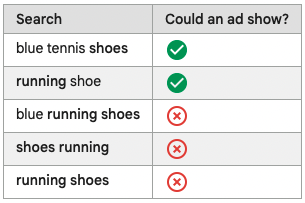
This is the default type of negative keyword. For negative broad match keywords, your ad won’t show if the search contains all your negative keyword terms, even if the terms are in a different order. The ad may still show if the search contains only some of your keyword terms.

Example: running shoes

Negative phrase match

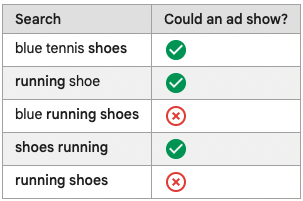
Your ads won’t show if the search contains the exact keyword terms in the same order. The search may include additional words, but the ad won’t show as long as all the keyword terms are included in the search in the same order. The search may also include additional characters to a word and the ad will show even when the rest of the keyword terms are included in the search in the same order.

Example: “running shoes”

Negative exact match

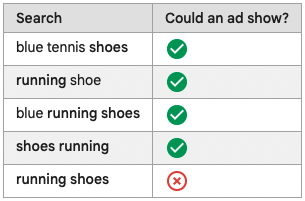
For negative exact match keywords, your ad won’t show if the search contains the exact keyword terms, in the same order, without extra words. Your ad may still show if the search contains the keyword terms with additional words.

Example: [running shoes]

Negative Keyword Lists

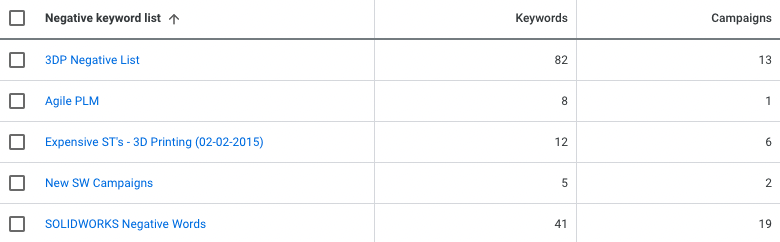
Negative keywords are incredibly important to an optimized Google Ads account. However, there are often situations where multiple negative keywords apply to multiple campaigns. For situations like this, use negative keyword lists. These are lists of negative keywords that can be applied to multiple campaigns. When a negative keyword list is added to, the added negative keyword is automatically applied to any campaign using that negative keyword list.

Examples of negative keywords that could be applied to multiple campaigns are:

  • free
  • jobs
  • career
  • “how to”

Quality Score

The Quality Score is available at the keyword level and is a tool to determine the ads relevance to the keyword and the quality of the experience the landing page provides. A higher score means your ad and landing page are more relevant an useful to someone searching for your keyword, compared to other advertisers.

A score above 5 means your ads and landing pages are outperforming the average advertiser for that keyword. This means you will be paying less than average for the same position. The opposite is true if the score is below 5.

Quality score is calculated using 3 components:

  • Expected clickthrough rate (CTR): The likelihood that your ad will be clicked when shown.
  • Ad relevance: How closely your ad matches the intent behind a user’s search.
  • Landing page experience: How relevant and useful your landing page is to people who click your ad.

Each component is evaluated with a status of “Above average,” “Average,” or “Below average.” This evaluation is based on a comparison with other advertisers whose ads showed for the exact same keyword, over the last 90 days.

How to Improve Expected CTR

When looking over a PPC account, one helpful metric to look at to gauge how well keywords are performing is their quality score.

Quality score is comprised of three things:

  1. Expected CTR
  2. Landing page experience
  3. Ad relevance

There are a couple pretty simple and obvious ways to improve ad relevance and the landing page experience. For example, implementing the keyword in the ad text will improve ad relevance. The landing page experience could be improved with a faster page speed and relevancy to the ad/keyword.

But what about expected CTR?

This training will cover a few suggestions of things you can do to increase the expected CTR of the keywords in any account you’re working on.

Use Less Keywords (more themed keywords) in the Ad Group 

Relevancy of the keywords to each other is very important. If your ad is getting a lot of impressions because you have 20 keywords that cover a broad span of themes, but is rarely getting clicks because it wasn’t exactly what the searcher was looking for, the quality score will decrease.

Improve the Ad Relevance of Your Keywords

The better the ad text matches/implements the targeted keywords in the ad group, the more likely people are to click through your ads. Yes, there is overlap here between these two elements of quality score! Include keywords in headlines, descriptions, display URL, the CTA, and anywhere else you can think of!

A/B Test Ads

You can test different variations of an ad in an ad group. It could be helpful to test different headlines or descriptions. Or a different display path. Compare the ads and see which gets a higher CTR. Then pause the one that doesn’t perform as well.

Ad Extensions

Extensions offer additional information to the searcher that can be helpful in enticing them to click on your ad. They also take up “Google real estate” on Google’s results page. If the ad is bigger, people are more likely to be drawn to it compared to its competitors.

Search Terms Report

In the search terms report, it is important to look for irrelevant keywords that are costing the client money, but aren’t turning into conversions, and excluding those. On top of that, there could be keywords with a high number of impressions and a low CTR. Those are search terms to consider making negative as well because they are clearly not in line with what the searcher is really looking for.

Improve Ad Relevance

Ad relevance shows how well your ads match your keywords. 

Google suggests the following if your Ad relevance has a status of “Below average” or “Average”:

  • 1. Language: Match your ad text directly to your keywords’ search terms.
  • 2. Narrow Down Ad Groups: Check your ad groups for keywords that don’t work well together. Consider splitting these into multiple ad groups that better match user searches. For example, if your client sells lots of different shoes, you might split up “dress shoes” from “running shoes”, and even more narrow targeting, like brand, specific style, or name. Imagine you are the one searching on Google, what would you search, and what would you look for that would make you click?

How to Improve Landing Page Experience

Once you’ve gotten people to your site, you need to give them a good experience so they will convert.

Google suggests working on the following if your Landing page experience has a status of “Below average” or “Average,”:

  • 1. Landing page content: the landing page should give people exactly what they searched for. For example: a search for “flannel shirts” should go to a page featuring flannel shirts, not any type of shirt.
  • 2. Messaging: Your ad and landing page should be consistent including having the same special offers and calls to action.
  • 3. Conversion Rate: CR does not impact your landing page experience score, however, Google suggests that it is a good metric to go by for yourself of how good a landing page is.
  • 4. Mobile Friendliness: People want to be able to navigate your landing page and website easily, and most people use mobile devices. Make sure your landing page is easy to use on a mobile device. Use the Mobile-Friendly Test as well as test it out yourself on your phone to see how well the page works. 
  • 5. Loading Speed: Loading speed is a huge factor in whether people will bounce or not. The faster your landing page loads, the more likely someone will stay long enough to convert.

Your Keyword does not need to be “word-for-word” on your landing page to have a good Landing Page Experience score. It’s best to focus on making your landing page a great experience for the user, and this includes using natural language over exact keyword matching.

Landing Page

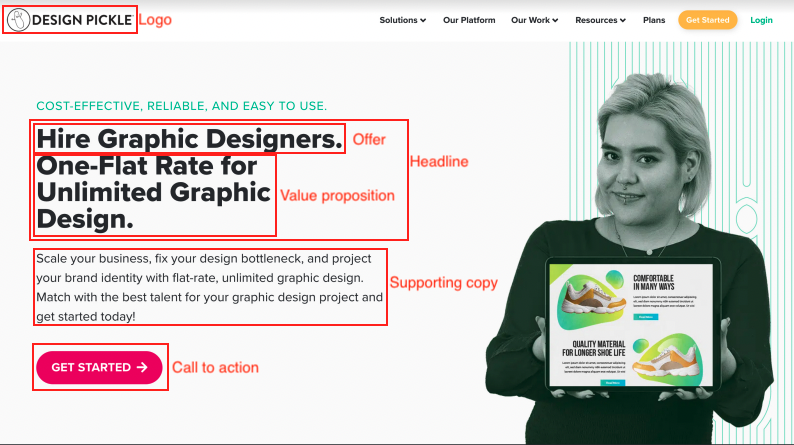
The landing page is incredibly important. A good landing page convinces the visitor to take a valuable action. This action is either a phone call, form fill, or purchase. Rarely, it will be something else, like a minimum duration spent on a page or watching a video. There are multiple designs, layouts, and versions of successful landing pages, so it’s not always easy to tell if a landing page will perform well or not, but there are a few key elements that every landing page should have:

  • Brand name/logo
  • Headline
  • Offer
  • Value proposition
  • Call to action
  • Supporting copy

From the above image, you should have a sense of each element of the landing page.

Brand name/logo: it’s the brand name and the logo

Headline: it’s the first thing you want the visitor to read and should sum up what the rest of the page will be about. With PPC, typically, you want the headline to match the keyword that was searched.

Offer: this is a little vague and could be located in multiple places on the landing page. The offer is the product or service the business is offering. It’s what the visitor will get if they complete the call to action.

Value proposition: what sets the business apart from its competitors. Another way to think about it is, “if I am your ideal client, why should I choose you over your competitors?”

Call to action: the valuable action you want the visitor to take. In the above example, it would be clicking the button “Get Started” and doing whatever comes next. That could be filling out a form, calling the business, scheduling a meeting via calendly, or something else.

Supporting copy: any additional content besides the headline that’s meant to give additional context or helpful information the visitor might want.

The Exam

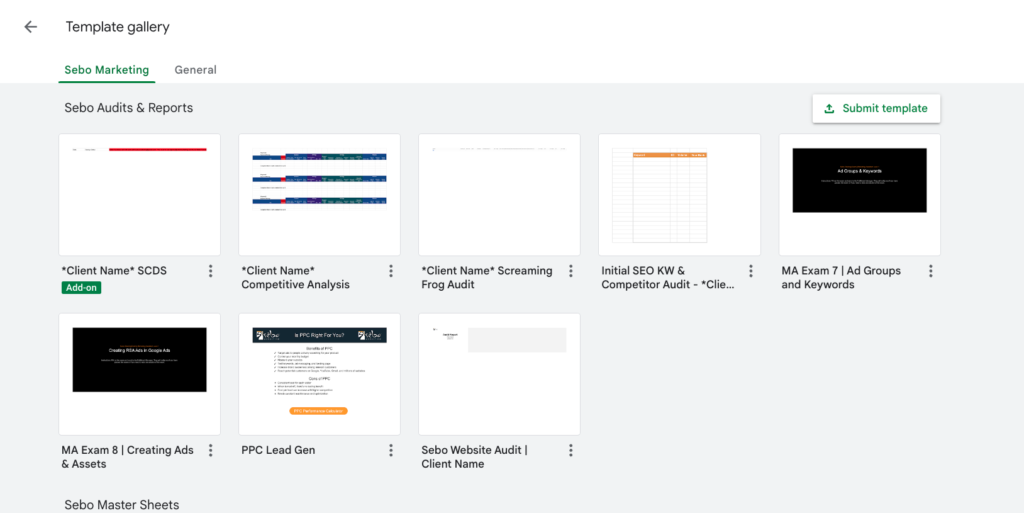
For this exam go to Google SHEETS and find the Exam in the Template Gallery. Click on it and it will automatically make a copy for you. Once you complete the exam send it to the Fulfillment Manager. Once they approve your exam you can begin the next exam.