Welcome to the first SEO knowledge exam!
This training will be your first real introduction to Search Engine Optimization with a focus on On-Page work.
Last Updated on January 14, 2025
This training will be your first real introduction to Search Engine Optimization with a focus on On-Page work.
Search Engine Optimization is the process of getting a website to show up in organic results on search engines, the main goal is to get a site showing at the top of a search engine for the right keyword and to the right page, and if done correctly, this will produce more traffic to that website. At Sebo, we focus primarily on Google’s search engine as it is the most widely used internet search tool and its algorithm encompasses the same principles as other search engines that are available.
In order to be good at SEO, you first need to know how search engines work. Watch this video from Google to better understand Google Search.
Read This: The Beginners Guide to SEO by SEO Moz.
The 5 Components of SEO are Text, Link, Popularity, Size, and Time.
Text Component
Say you were to Google the phrase “how fast can a cheetah run” and Google showed you the result “Fastest Aquatic Animals….” You would think, “stupid google, that’s not what I searched for”. This is where the text component comes in. Google crawls a web page and stores the text of that page. When a query is made, Google searches for the pages that contain the text used in the search query. Making sure the targeted keyword is in the title tag, URL, header, and body text will greatly increase a pages chance of showing up in the results.
Link Component (aka Internal Links)
The link component refers to the internal structure of a website. Google expects a website to have more internal links to its most important content. If the internal link structure of a website gives the most links to a services page, Google is going to assume that’s the most important page on the website. If a page has lots of links and is easy to get to, this is a strong signal to Google of the importance of that page. This is important when designing a website. Often, blog pages or contact us pages will have the most internal links on a website. This is usually an incorrect practice, and a change to the internal link structure should be made to make other pages, like the homepage, or a services page, the most linked to page within the website.
Popularity Component (aka Links to Your Site or Backlinks)
One of the main factors that set Google apart from other search engines is how they integrate the popularity of websites into their search algorithm. To judge the popularity of a website, Google uses links to that site. In general, a website that has more quality links has a higher popularity score. A quality link is a link that is relevant to the linked to content, is from a reputable website, or a website that also has a high popularity score. Another component of good popularity is the backlink to domain ratio. If you had a lot of links, but they all came from the same website, that would look fishy to Google. You want a high number of links from a variety of websites. A good backlink to domain ratio is 10 to 1, for example, if you had 100 links, you would want them to be from at least 10 different domains.
Size
It’s not a good practice to have a stagnant website. As has been stated before, Google cares about the freshness of a website. Part of being fresh is adding new content. As a site adds new content the domain will steadily grow. Google wants to see steady, consistent growth over time. There are many ways to increase the size of a website, but one of the easiest is through creating quality blog posts. For SEO clients, seek to grow the website by at least one page per month.
Time
Google gives more credence to websites that have been around longer. The older the website the better. Google will trust a website that has been around a while and proven itself with time more than a similar website that was created more recently. Unfortunately, we can’t travel back in time and create a website so there isn’t much we can do about time.
Quality, fresh, and unique content are words that Google, in regards to SEO, uses to describe useful content.
Quality
Quality refers to how much people like your content. From a simplistic view, Google’s crawlers evaluate content quality by measuring the quantity and quality of the links from other websites pointing to that specific page on your site. For example, page A has 100 links pointing to it, while page B only has 3 links pointing to it. Page A is considered to be a higher quality page and will do better in the search results.
Fresh
Fresh content is content that is new. This can refer to brand new pages or older pages that have been edited with new content. Google wants to see pages being consistently added to the site over time. It’s not good to go a long time with no pages being added or to have a lot of pages added at once. They also don’t want to see pages sitting stagnant for years.
Unique
Unique content is content that was created first on your website. Google wants to give credit to the first page to post unique content. If you copy content from other websites, Google will punish your site and you will show up lower in the search results. The way Google knows which content was posted first is by when it was crawled. This highlights the importance of making sure each of your pages can be crawled and read by Google. If you post content on your site, then someone duplicates that content on their site and Google crawls their duplication first, they will get the credit for Unique content and you will be penalized. Make sure that your content is unique to your website!
Google wants good quality content that is unique and attributed to the original source. When creating new content, it is important to make sure that you don’t duplicate other content from other websites. That’s not to say you can’t quote another article, or have a video on your website that’s on another website first. The intent is what matters. If you are creating useful content that adds something useful and unique to the web as a whole, you don’t have to worry about duplicate content; however, clients often get into trouble when they do something without understanding (such as copying their whole website to a new domain without getting rid of the old one). Read more on duplicate content. Following is a short video on how Google handles duplicate content:
On-page SEO is any SEO work you do that takes place on the actual pages of a website. Editing content, adding new content, or even changing the link structure of the site are all examples of on-page SEO. The most common task for on-page SEO is making sure the selected keyword is implemented in the correct places on a specific page. There are, however, many other tasks that can be done on-page to improve organic results. Some of those include changing the internal link structure, eliminating duplicate content, fixing crawl errors, and more. Learn more at the blogs on on-page SEO on Moz.com.
Keyword research is the first step to any on-page SEO task. Use this training to learn how keyword research works.
A sitemap is a listing of all the pages on your site. It is designed to tell the search engines what pages on your website are new or updated and are available for crawling. It helps Google crawl and index each page on your website.
Learn more about how to set up Search Console here.
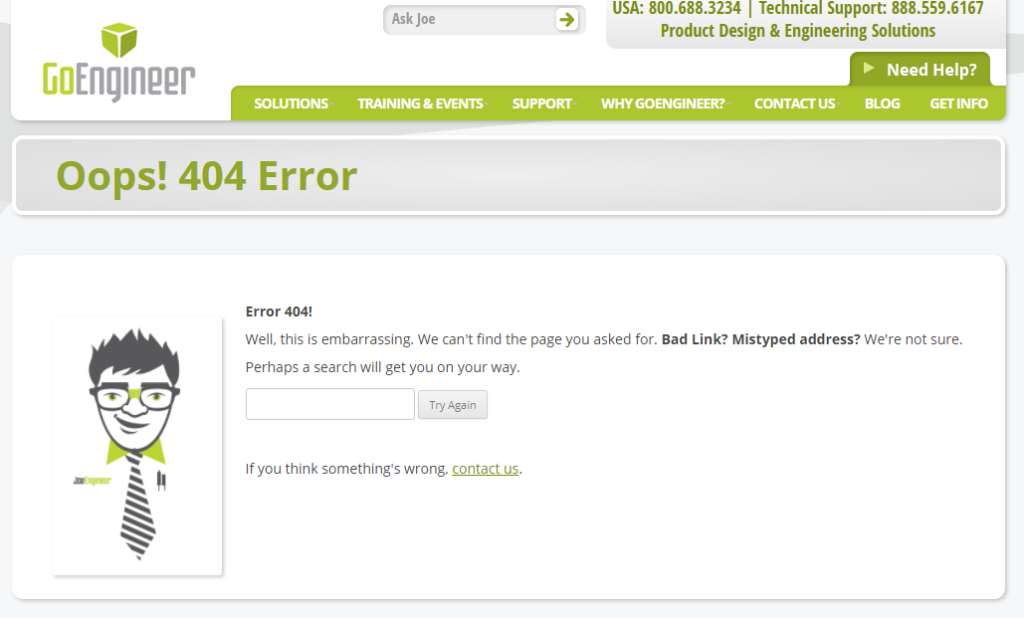
Crawl errors come up when something happens on a web page that inhibits the ability of bots to crawl the website effectively. Most of the time, crawl errors refer to broken links. A link is broken when it points to a URL that no longer exists. Two negative things happen with broken links. First, you lose the link juice that gets wasted on a non-existent page. Second, the user experience is worse. If someone clicks on a link and comes to a broken page, they are very likely to have a negative experience and leave your website. Google wants to send people to websites that will give searchers a good experience, so a lot of crawl errors lead to lower rankings.
There are 2 main ways to fix crawl errors. The best way is to find the pages on your site that link to the non-existent page, then correct the link to point to the right page. If the link to the page comes from other websites, the easiest way to fix these types of crawl errors is with redirects. A redirect will send someone who clicks on a broken link to, instead of the non-existent page, a chosen substitute URL. This URL will get the traffic and the link juice that is sent to the missing page. Setting up redirects is important to both the rankings and the user experience.
You may have come across 404 pages like this:
Are outbound links a good thing?
Here are three articles that shed some light on the topic:
As a Level 1 Marketing Assistant, you will not be doing any Local SEO tasks, but we do want you to be familiar with the concepts. Read this training to understand Local SEO basics.
Read about Black Hat SEO concepts here.
Moz.com has published an awesome SEO Glossary – here are some of the terms you will need to know in order to succeed in on-page SEO.
Black hat: Search engine optimization practices that violate Google’s quality guidelines.
Crawling: The process by which search engines discover your web pages.
De-indexed: Refers to a page or group of pages being removed from Google’s index.
Featured snippets: Organic answer boxes that appear at the top of SERPs for certain queries.
KPI: A “key performance indicator” is a measurable value that indicates how well an activity is achieving a goal.
Organic: Earned placement in search results, as opposed to paid advertisements.
Query: Words typed into the search bar.
Ranking: Ordering search results by relevance to the query.
Search engine: An information retrieval program that searches for items in a database that match the request input by the user. Examples: Google, Bing, and Yahoo.
SERP: Stands for “search engine results page” — the page you see after conducting a search.
Traffic: Visits to a website.
URL: Uniform Resource Locators are the locations or addresses for individual pieces of content on the web.
Algorithms: A process or formula by which stored information is retrieved and ordered in meaningful ways.
Backlinks: Or “inbound links” are links from other websites that point to your website.
Bots: Also known as “crawlers” or “spiders,” these are what scour the Internet to find content.
Caching: A saved version of your web page.
HTML: Hypertext markup language is the language used to create web pages.
Internal links: Links on your own site that point to your other pages on the same site.
Navigation: A list of links that help visitors navigate to other pages on your site. Often, these appear in a list at the top of your website (“top navigation”), on the side column of your website (“side navigation”), or at the bottom of your website (“footer navigation”).
NoIndex tag: A meta tag that instructions a search engine not to index the page it’s on.
PageRank: A component of Google’s core algorithm. It is a link analysis program that estimates the importance of a web page by measuring the quality and quantity of links pointing to it.
Relevance: In the context of the local pack, relevance is how well a local business matches what the searcher is looking for
Sitemap: A list of URLs on your site that crawlers can use to discover and index your content.
Local queries: A query in which the searcher is looking for something in a specific location, such as “coffee shops near me” or “gyms in Brooklyn.”
Long-tail keywords: Longer queries, typically those containing more than three words. Indicative of their length, they are often more specific than short-tail queries.
Search volume: The number of times a keyword was searched. Many keyword research tools show an estimated monthly search volume.
Seasonal trends: Refers to the popularity of keywords over time, such as “Halloween costumes” being most popular the week before October 31.
Seed keywords: The term we use to describe the primary words that describe the product or service you provide.
Alt text: Alternative text is the text in HTML code that describes the images on web pages.
Anchor text: The text with which you link to pages.
Duplicate content: Content that is shared between domains or between multiple pages of a single domain.
Keyword stuffing: A spammy tactic involving the overuse of important keywords and their variants in your content and links.
Link accessibility: The ease with which a link can be found by human visitors or crawlers.
Link equity: The value or authority a link can pass to its destination.
Link volume: The quantity of links on a page.
Meta descriptions: HTML elements that describe the contents of the page that they’re on. Google sometimes uses these as the description line in search result snippets.
Protocol: The “http” or “https” preceding your domain name. This governs how data is relayed between the server and browser.
Redirection: When a URL is moved from one location to another. Most often, redirection is permanent (301 redirect).
SSL certificate: A “Secure Sockets Layer” is used to encrypt data passed between the web server and browser of the searcher.
Thin content: Content that adds little-to-no value to the visitor.
Title tag: An HTML element that specifies the title of a web page.