Last Updated on September 27, 2024
Keyword implementation is one of the first things Google is going to look at when deciding what results to show. If someone searches “pinnacle golf balls” and your website doesn’t have any of those words on any of your site page, Google won’t even consider showing your site in the search results. Using the right keywords on your site gets you into the running for being in the search results. Putting those keywords in the right places helps even more.
While there are lots of places you can use a keyword on the site, there are 5 Key Places to implement your keyword. They are, in order of importance, page title, body, URL, headline, and meta description. We want to see a congruent message across all the elements of a page, so the same keyword should be implemented in each place. (The importance order is taken from a study done by Moz.com ranking SEO factors.
Title Tag Best Practices
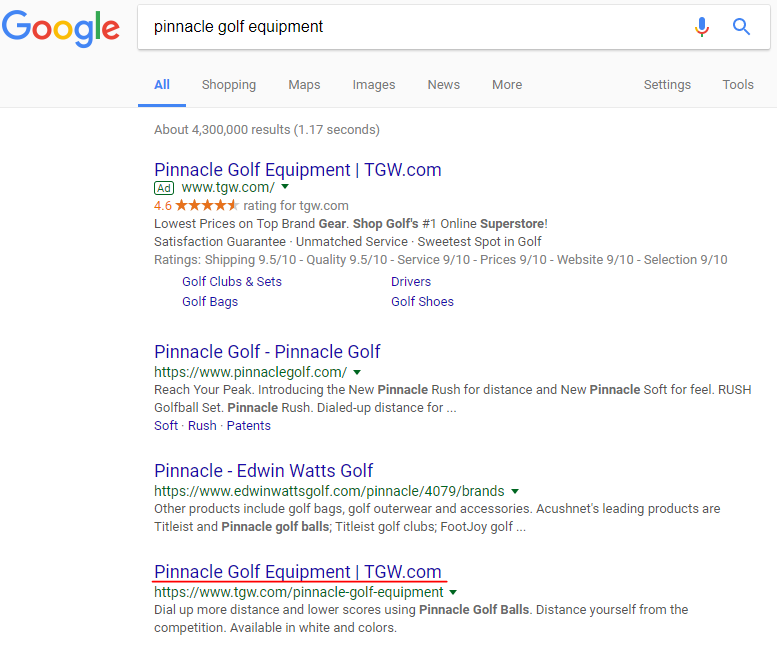
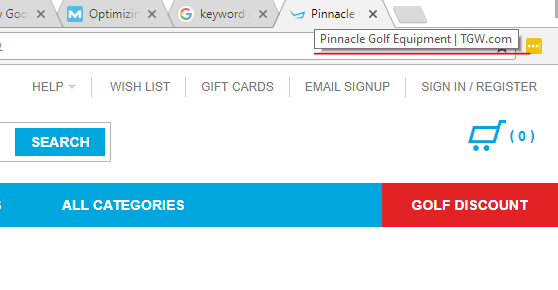
The page title is the most important place to implement a keyword. It is best to use the keyword as close to the start of the title tag as possible. They are very important in getting your page into the running to show up, and also in getting people to click on your result. The title shows up on the tab of a website and the link in the SERPs(search engine results page). There is a limit to how long a page title should be. In general, it’s best practice to keep the page title less than 60 characters.
- Keyword should be implemented as far to the front as possible
- The title shouldn’t be more than 60 characters
- The brand name should be included in the title somewhere
- Include a value proposition or selling point if possible
- It’s important to remember the user when creating a title tag. Make sure that it is something that will grab someones attention and make them want to click.
- Avoid using stop words
- Keep the title tag unique between different pages
- Good example of title tags:
- “Best Burgers In London: 9 Delicious Buns You Don’t Want to Miss”
- “Nike Trainers & Shoes | Mens & Womens | schuh”
- “Radiohead: A Moon Shaped Pool Album Review | Pitchfork”
- Bad examples:
- “BarChick – Bar Chat | London’s Best Burgers”
- Trainer Sale – great savings on Sneakers, including discounts on…”
- “Is there hope in Radiohead’s ‘A Moon Shaped Pool’? – Mashable”
How to Change the Title Tag in WP
Paragraph Best Practices
Any paragraph text within a web page is considered the body text. The body text is the information that gives features and benefits for a product or service, and the general information for a blog post or news article. Google want’s to see that the main bulk of content on a web page is about the same keyword that is implemented in the page’s title. It’s important that the body is written for the user and not the algorithm. User experience is most important, but in it is a best practice to implement the keyword in the first 100 words of the body content.
How to Edit the Body Text in WP
Meta Description Best Practices
The meta description is very important, not because it has a lot of weight for Google’s algorithm, but because this is the text a user sees in their organic search results. Similar to the ad description in a text ad, the meta description should include a value proposition or selling point as well as a call to action. The meta description can greatly influence your click through rate as it tells the user what your page is about, so they get a gimps right away if the page is really relevant to what they are searching for. Make sure the description is written in a way that will capture your target audience and get them to click through to the page.
How to Edit the Meta Description in WP
URL Best Practices
The URL is another key place to put a keyword. The URL is going to be one of the things people see in the result, so the closer it can be to what they are searching the more likely they are to click. It also shows Google that the page is more likely to be about what is searched.
It is best to choose a URL with the target keyword within the URL from the get go, the URL can be changed but this is not always the best practice. You can do serious damage to a page by changing the URL if Google has a lot of data on the page already or if you don’t set up a redirect correctly.
Never change the URL of a page unless absolutely necessary, and without the proper training and go ahead.
How to Change the URL in WP
Alt Text
You can change the Alt text of images and your images can show up in Google’s Image results. Anywhere you can add the kw and help google’s search engines to understand what the page and content is about, can help your page rank better for the kw. As long as it is inserted where it makes sense, and doesn’t ruin the user experience.
How to Edit Alt Text in WP