Google Ads uses Assets (formerly known as extensions or formats) to allow advertisers to enhance their ads with additional information on the product, service, or business. There are three assets that should always be included in every ad group: Sitelink Assets, Callout Assets, and Call Assets. Structured Snippet Assets should added as well where applicable.
Along with increasing the chance an ad will get clicked, including assets also increases the ad rank of an ad. This means that Google will be more likely to show the ad at a higher average spot and/or at a lower cost per click. It is important to remember when creating list-based assets that Google determines the order in which the assets are shown.
Sitelink Assets
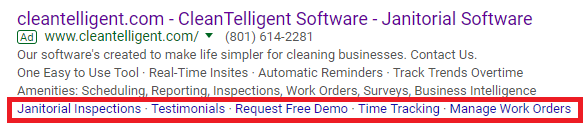
Sitelinks are links to additional pages within a website. Say we have a client who sells sports equipment, someone searches “football cleats”, and an ad shows up with the headline about football cleats that links to a page selling football cleats. This experience would be great for the person doing the search. However, since they are searching for football cleats it is safe to assume that some searches will also want other football equipment.
Here is where we can use sitelinks. We could create sitelinks advertising quality footballs, sports cones, practice football jerseys, and more. These links would lead the advertiser to different, but relevant pages. Even if the searcher doesn’t click on the sitelinks, they may improve the chance of the main ad getting clicked because the searcher will know they can get additional football equipment along with their cleats.
Callout Assets
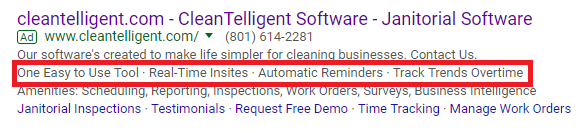
CalloutAssets provide additional information about the product/service you are advertising. Unlike sitelinks, callouts are not clickable. In general, think of callouts as “calling out” benefits or features of the product/service (i.e. free consultations, lifetime warranty, price matching). These benefits or features are in addition to what’s already in the ad. It is a best practice to create at least 4 callouts.
Call Assets
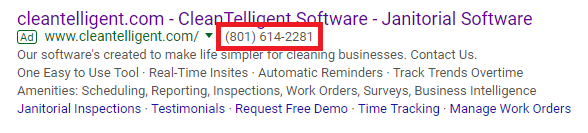
Call Assets are simply an asset that shows a clickable phone number in the ad itself. The assets can track phone conversions if the setting to allow Google to use a forwarding number is enabled. This makes the phone number that is shown in the ad a randomly generated number that forwards to the actual business phone number. When someone clicks or calls this number and stays on the phone for the required time, 60 seconds by default, a conversion will be tracked.
Lead Form Assets
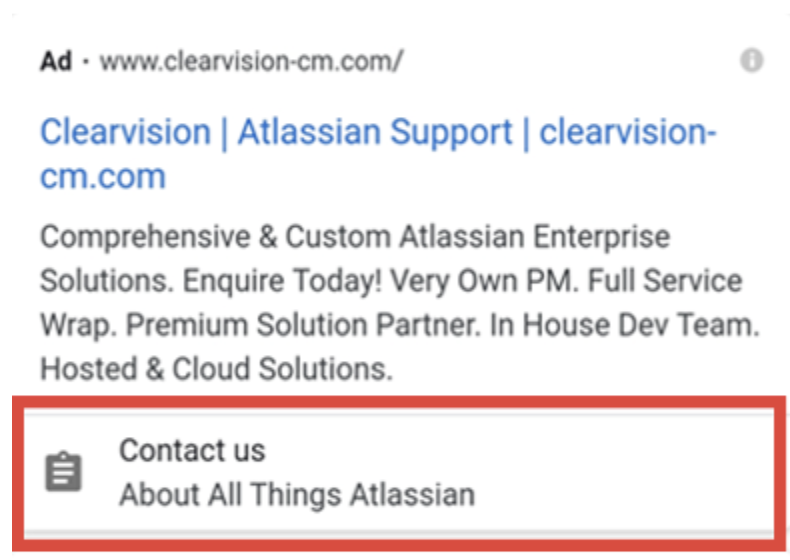
Lead Form Assets are useful because they allow people to submit their information in a form without having to actually visit the website. Their main benefit is that they allow you to get high-quality leads while providing a seamless experience for your customers. People can click on the lead form asset directly in the SERP, let their information auto-populate (if they are signed in to their browser), and click submit. It lowers the barrier of entry and makes it easier for customers to go through with submitting a form.
While there are some positives to Lead Form Assets, the barrier to entry for the client is so high that we typically don’t use them. If the client doesn’t have a CRM, all submitted forms must be downloaded to a spreadsheet to be viewed. Seeing as how time is of the essence when you receive a lead (and you want to respond as quickly as possible), constantly downloaded CSVs to see if you have gotten any leads is unrealistic. If the client has a CRM, a webhook integration (such as Zapier) can be utilized to push leads directly into the client’s CRM, which is a much better solution. However, many of our clients don’t have CRMs, which makes this impossible.
How to Set Up Lead Form Assets
Dynamic Image Assets
To speak the language of Google Ads, it is important to understand what it means when something is “dynamic.” There are dynamic ads, dynamic ad groups, dynamic image assets, etc. For something to be “dynamic” in Google Ads, it means that it is automated by Google and requires little control from the owner of the account.
In the case of dynamic image assets, Google identifies and uses images on the landing page of the ads, looking specifically for images that are most relevant to the query based on the ad’s landing page. Google has a manual and automated process of making sure those images are suitable to show and will not display a dynamic image asset if there are no images on the landing page or the images are low in quality.
The benefits of using dynamic image assets overlap with the benefits of a standard image asset. Images offer a way to differentiate yourself from competitors on Google’s SERP, draw the eye of a searcher, and will improve your CTR.
Something to note: Google recommends using image assets and dynamic image assets TOGETHER because “image assets will always serve over dynamic image assets.”
At Sebo, most MCs tend to prefer standard image assets over dynamic image assets. It’s nice to have control over what images show and you can’t always trust Google’s system of choosing photos. However, they are often worth trying out if the client’s website has good images.
Structured Snippet Assets
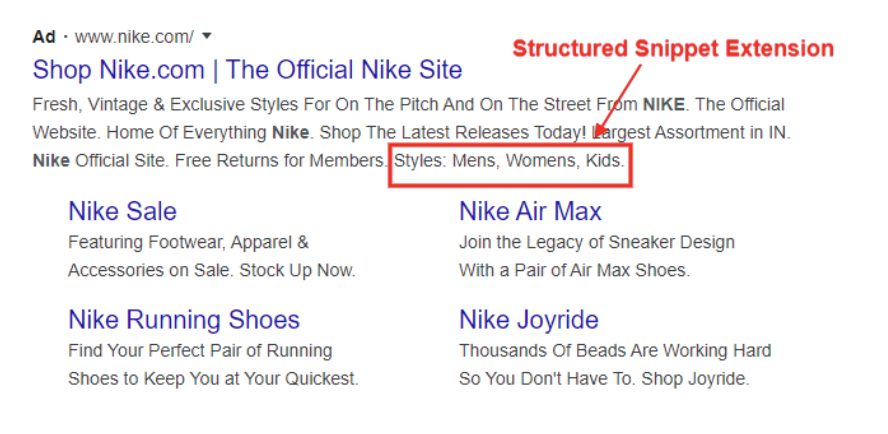
Similar to callout assets, structured snippet assets are specific aspects of your products and services that you want displayed on your ad. The difference, however, is that structured snippet assets are grouped into a category and displayed as supporting values to the categorical header. Structured snippets should provide a complete group of products or services that your business provides.
Here is a list of available headers:
Amenities
Brands
Courses
Degree programs
Destinations
Featured hotels
Insurance coverage
Models
Neighborhoods
Service catalog
Shows
Styles
Types
Examples: “Wifi” is an amenity. “Costa Rica” is a destination. “Downtown” is a neighborhood.
Best practices:
Include 4 values per header.
Add more than one header-value set. This gives Google more options to display.
Business Name Assets
A business name asset appears next to your business logo in an ad and it is just what it sounds like— the name of your business. The business name asset is good to have in all accounts where it is available.
In some accounts, the client may have previously set up their Google Ads account, but used the wrong verified advertiser name or that name is not close enough to the name of their business. In these cases, Google will disapprove the business name if you try and add something too different. There may be some work-arounds to this, but they are almost never that necessary.
Best practices:
Either the account or each campaign has a business name (preferably at the account level)
Business Logo Assets
Business logos are good to have in every Google Ads account. They show up as the icon next to your ad. Google does not guarantee that it will show your logo once uploaded if it does not meet quality standards and will instead use a placeholder logo.
There are certain specifications to make sure your logo is approved:
There cannot be too much text in the logo
The logo cannot be blurry
It must be square shaped
It must not violate any of Google’s other policies
Best practices:
Make sure the account level or each campaign has a logo, if possible (preferably account level).
Use an AI, photoshop, or crop the logo, if allowed, to remove texts from the logo to help it get approved.
Headline Assets
Headline assets are headlines that you can add to your campaigns or your account, but they are slightly different than headlines you find directly in ad creation. You are able to add headlines to different campaigns and you are even able to schedule these headlines. So, if you have a client that needs certain headlines showing at certain times, such as for a promotion, this might be a good option to look at rather than going in and manually editing the headlines once the time period is up.
Most of the time, headline assets are not something that we usually need to deal with since they don’t move the needle very much if the rest of your ads and assets are optimized. Usually, we will edit headlines in the ads themselves.
Best practices:
Do most headline-related things in the ads themselves.
If you choose to create headlines here, make sure they include an end date if they are for promotions or something similar.
Description Assets
Description assets work the same as headlines assets, but they are descriptions instead. This means that they are capped at 90 characters.
Like headlines, you should really only use them in scenarios where you have a promotion where you want to use the scheduling features.
Best practices:
Do most description-related things in the ads themselves.
If you choose to create descriptions here, make sure they include an end date if they are for promotions.
Location Assets
To set up location assets in Google Ads, link your Google Business Profile if you have one so Google Ads can access your business locations. After connecting the account, choose which locations or location groups you want to use. Once applied to your campaigns, Google can show your business address, map location, and directions directly in your ads when relevant. Refer to the video for more information on how to set up a location asset or an affiliate location (locations that sell your products or services but you do not own them).
Best practice:
Add locations for businesses who want to increase foot-traffic sales.
Price Assets
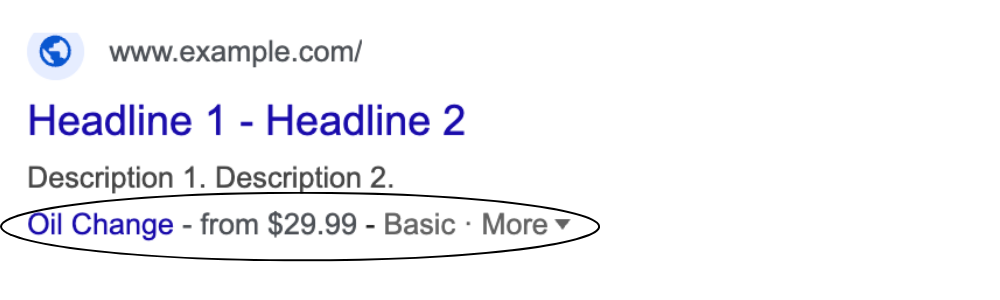
Price assets allow you to assign values to what you are selling so people can see it directly in the ad. Price assets are the only assets that don’t necessarily increase clicks to an ad, but decreases clicks, but these clicks are from people that are more willing to buy what your business has to sell for the price it is set at. To create a price asset, you must enter in all the specifications for your price, including type, currency, a price qualifier (if applicable), header, URL, description, and the unit (if the pricing is per hour, day, year, etc).
Best practices:
Only make a price asset if it is approved by the MC
Add if you want to further qualify who is clicking on the ad
Promotion Assets
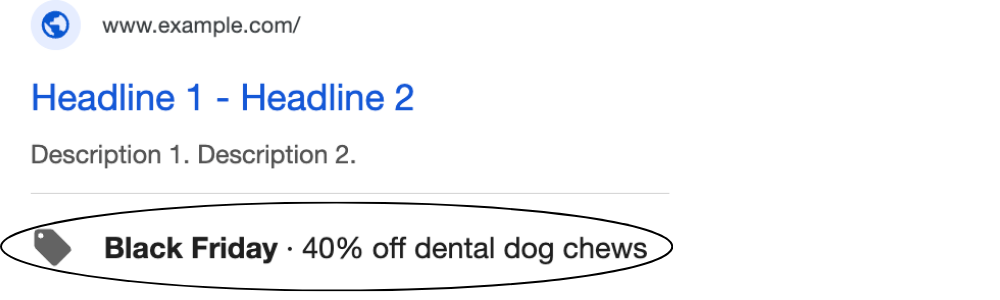
Promotion assets let you give discounts to customers clicking on your ads. There is an option to add already existing promotion assets to the account or different campaigns, but many times you will be making one from scratch. To set up a promotion asset, you will need to choose an occasion, currency, promotion type, amount, the item, final url, and promotional details, and start/end dates. Most of this is self-explanatory, but you should know these different types of promotion types and details.
Here is a list of available promotion types:
Monetary discount
Percent discount
Up to monetary discount
Up to percent discount
Here’s a list of available promotion details:
None
On orders over
Promo code (Alphanumeric)
Promo code (Barcode)
Promo code (QR code)
Best practices:
Only set up a promotion when an MC gives you a task asking you to do so.
Fill out all applicable fields.
Set an end date for the promotion so it doesn’t go on forever by accident.