Last Updated on August 28, 2026
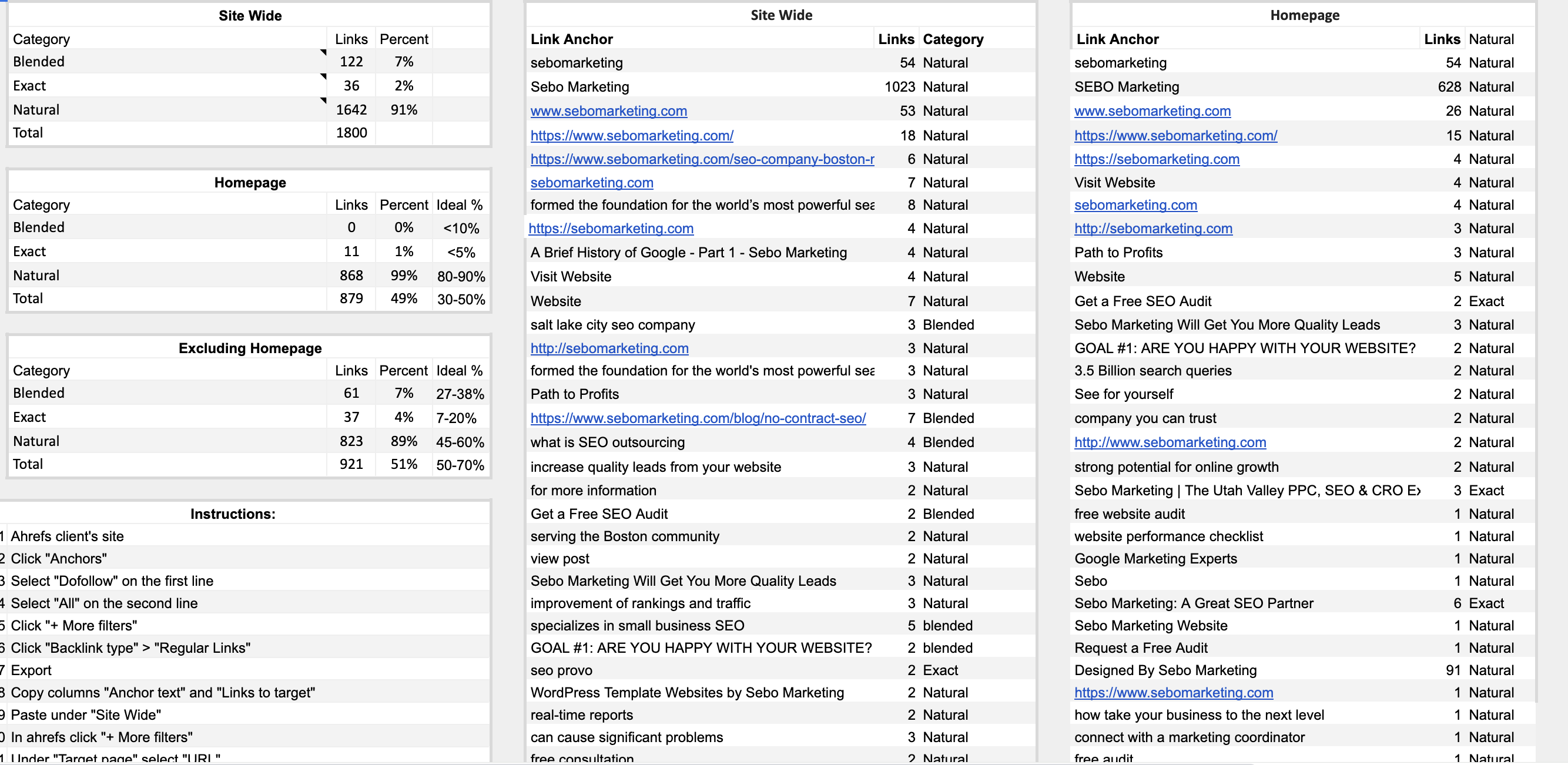
In the “In depth SEO Audit” that you created, navigate to the “Link Anchor %” tab. This is the template that you will be using for this training.
**If you are not doing the marketing training and just want some guidance on how to do this task, there is also an anchor text template outside of the SEO Audit. It is located in our template gallery.
Anchor Text refers to the the text that is used to link to pages on our website. Some common examples are “click here”, “Sebo Marketing“, and “ppc company“. There are different types of anchor text. The three types are
exact, blended, and natural.
Exact: anchor texts match keywords we are targeting exactly. For Sebo Marketing an exact example would be “Provo PPC Company”.
Blended: anchor text has parts of a keyword. For Sebo Marketing a blended example would be “learn about SEO Marketing”.
Natural: anchor text that doesn’t have keywords in it. It generally is more natural wording and is terms you’d see often like “click here” and “learn more”. The brand name and links (sebomarketing.com) are both natural anchors as well.
On the left-hand side of the Link Anchor % sheet, take note of the ideal percentages for each anchor text category. Also note the differences between Homepage and Non-Homepage pages.
Below are the instructions for how to complete the template:
Instructions
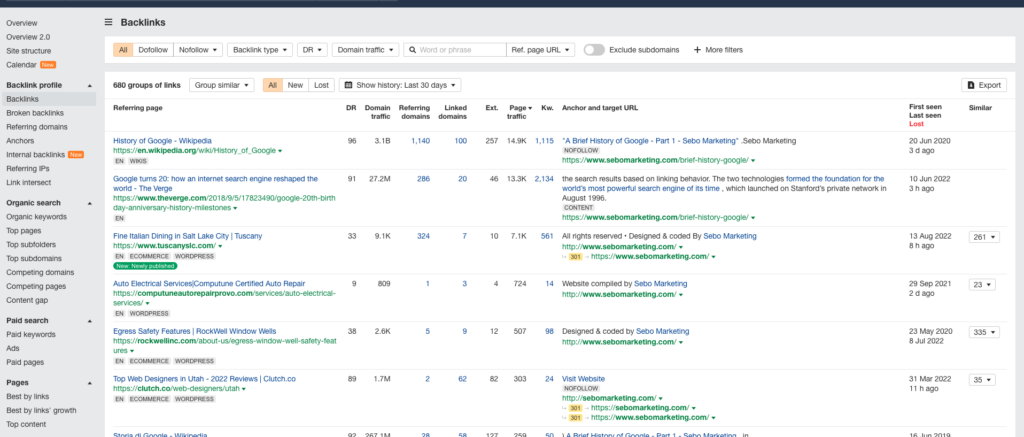
- Ahrefs client’s site
- Click “Anchors”
- Select “Dofollow” on the first line
- Select “All” on the second line
- Change “Best links” to “No spam”
- Change “Show history” to “Don’t show”
- Click “+ More filters”
- Click “Backlink type” > “Regular Links”
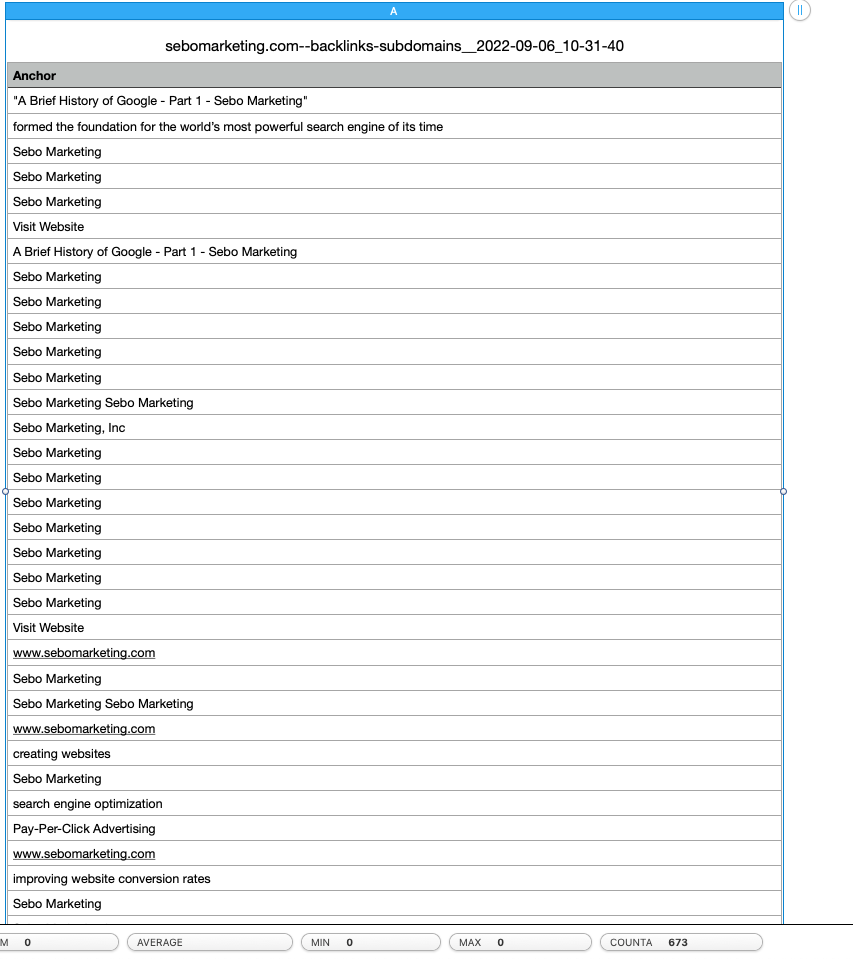
- Export
- Copy columns “Anchor text”, “Links to target”, and “Referring domains”
- Paste under “Site Wide”
- In ahrefs click “+ More filters”
- Under “Target page” select “URL”
- Change “Contains” to “Is”
- Copy homepage URL from browser
- Paste homepage as value
- Export
- Copy columns “Anchor text”, “Links to target”, and “Referring domains”
- Paste under “Homepage”
- In ahrefs click “Target URL” filter
- Change dropdown from “Is” to “Is NOT”
- Export
- Copy columns “Anchor text”, “Links to target”, and “Referring domains”
- Paste under “Excluding Homepage”
Step 2
Sort out images and delete all rows which have a blank space in “Link Anchor” column (there may not be any).
Step 3: Categorize each link
Exact: anchor texts match keywords we are targeting exactly. For Sebo Marketing an exact example would be “Provo PPC Company”.
Blended: anchor text has parts of a keyword. For Sebo Marketing a blended example would be “learn about SEO Marketing”.
Natural: anchor text that doesn’t have keywords in it. It generally is more natural wording and is terms you’d see often like “click here” and “learn more”. The brand name and links (sebomarketing.com) are both natural anchors as well.
Step 4
- The ratios should automatically calculate, but if not, calculate the ratios and add them to the Google Sheet for that page.
- Check the “L/D” column: 3+ links per domain means a likely site-wide link
- Read the “RD %” column as the primary ratio, not “Percent”
Example of Completed Anchor Test Analysis
Exam:
- Complete the Anchor Text % tab in you In-Depth Audit